Redesigning how library members borrow, manage, and receive physical books — from browsing the catalogue to home delivery in one seamless mobile experience.


The Guelph Public Library serves thousands of residents — but the existing borrowing process was entirely in-person or through a clunky web portal. This project redesigned the full experience as a native mobile app, enabling members to browse, borrow, manage, and receive physical books delivered to their home via Instacart.
Library members — especially elderly residents and busy parents — couldn't easily browse the catalogue, track due dates, or request book delivery from their phones. The existing digital touchpoints were fragmented and mobile-unfriendly..
Design a clean, accessible mobile app for Guelph Public Library that handles the full borrowing lifecycle: browse catalogue → borrow → manage loans → request home delivery → track delivery in real time.
End-to-end UI/UX — user research, competitive audit, personas, journey mapping, wireframes (lo-fi → hi-fi), usability testing (2 rounds), visual design system, and Figma prototype for developer handoff.
Clarity first — every action is obvious. Trust through transparency — real delivery status, due dates always visible. Inclusive — WCAG AA compliant for elderly members. Familiar but fresh — feels like a premium app, not a government portal.
All 9 Screens — Your Actual Figma Designs
Each pain point maps directly to a design decision — no feature was added without a clear user problem it was solving.
The existing catalogue was a desktop-first web portal. On mobile, text was unreadable, covers didn't load, and filters were broken. Members resorted to visiting in person just to see what was available.
Members had no proactive way to see loan due dates on mobile. Overdue fees were discovered at return time — creating negative, stressful interactions with the library brand.
For members who cannot physically visit — those with mobility issues, seniors, parents with young children — there was no delivery option and no accessible digital interface to use independently.
The library had begun piloting Instacart delivery but members received no live tracking. A simple email confirmation with no status updates caused anxiety and repeated support calls.
Each pain point maps directly to a design decision — no feature was added without a clear user problem it was solving.
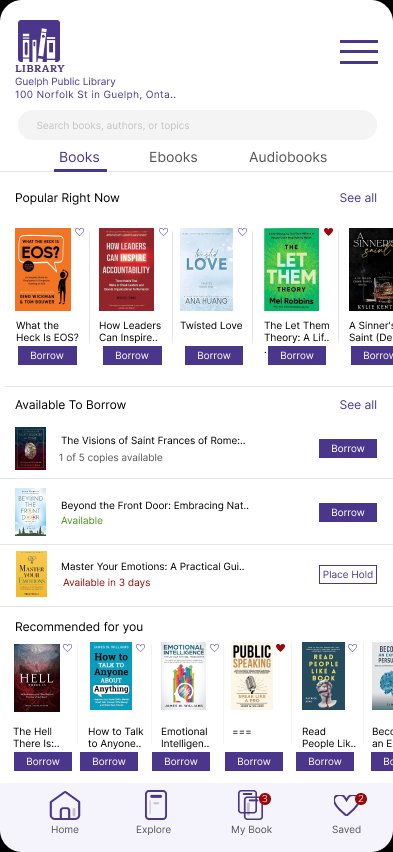
Designed a Books / Ebooks / Audiobooks tabbed home screen with "Popular Right Now", "Available to Borrow", and personalised "Recommended for you" sections — all visible and usable on a 390px screen with one thumb.
A dedicated "My Book" tab shows all borrowed items with colour-coded due dates (green = safe, orange = due soon, red = overdue), hold counts, and one-tap Return or Read Now actions.
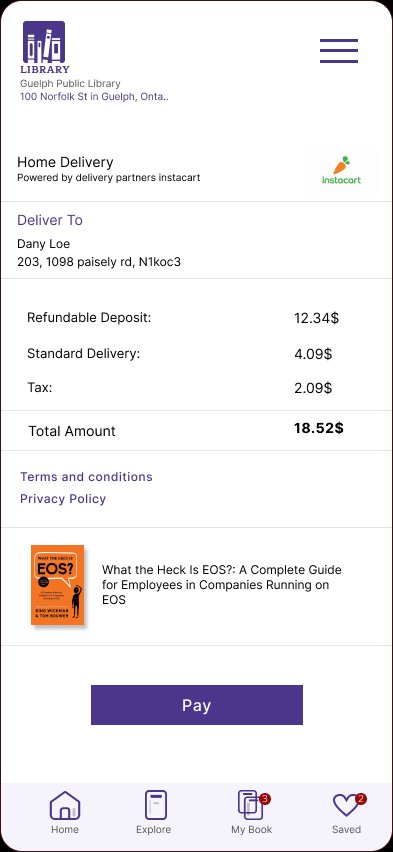
A full delivery checkout: address entry → order summary with itemised costs (refundable deposit + delivery + tax) → payment (Credit, Debit, PayPal) → instant confirmation. Fully accessible with large tap targets and WCAG-compliant contrast.
Real-time map showing the delivery partner's route, live ETA countdown ("Arriving in 13 min"), step indicators (Confirmed → Packed → Out for Delivery), and a direct call button for the delivery partner.
12 in-depth interviews with Guelph library members + a 55-person survey. Participants ranged from university students to retired seniors — all current library card holders.
"Do you currently use any digital library services on your phone?"
said No — the biggest single indicator that the mobile experience was failing the majority of members.
"Would you use home delivery if available through the library app?"
said Yes or Maybe — validating home delivery as the highest-demand feature not yet designed.
"How often do you get an overdue fee because you forgot a return date?"
had incurred an overdue fee in the last 6 months — confirming due date visibility as a critical usability gap.
"I love the library but I can't always get there — I have two kids under 5. If I could just get books delivered I'd use it every week."
"I had no idea my book was due in 2 days until I walked past a shelf and remembered. I got a fine. It put me off borrowing for months."
"The website is impossible on my phone. I gave up trying to find if a specific book was available. I just went in and asked at the desk."
"When they sent my book by Instacart I had no idea where it was. I didn't know if it was coming today or tomorrow. I waited in all afternoon."
I audited 5 existing library and book-borrowing apps to identify feature gaps and design patterns to adopt or avoid in the Guelph Library app.
| Platform | Mobile Catalogue | Loan Management | Home Delivery | Live Tracking | Accessibility | Payment Built-in |
|---|---|---|---|---|---|---|
| Guelph Library App (ours) | Full | Dashboard | Instacart | Real-time | WCAG AA | 3 methods |
| Libby / OverDrive | Good | Yes | No | No | Fair | No |
| BiblioCommons | Limited | Basic | No | No | Fair | No |
| Hoopla | Digital only | Yes | No | No | Fair | No |
| Toronto Public Library | Limited | Yes | No | No | Poor | No |
| Brooklyn Public Library | Good | Yes | Pilot only | No | Fair | No |
Not a single competitor offered home delivery + live tracking + in-app payment simultaneously. Guelph Library App is the first library app in Canada to offer a fully integrated physical book delivery flow.
Most library apps scored poor to fair on accessibility despite their audience heavily including elderly and low-mobility users. WCAG AA compliance was a non-negotiable design requirement from day one.
Research synthesis produced two primary personas representing the core member segments. Every design decision — tap target size, colour contrast, copy length, flow depth — was filtered through their needs.
"I read 3–4 books a month but I barely have time to get to the library. There has to be a way to do this from my phone."
"I've been a library member for 40 years. But now it's hard for me to get there. I don't want to stop reading — I just need help getting the books."
Mapping every moment from discovery through to doorstep delivery — identifying where design must work hardest to reduce friction and build trust.
Three fidelity levels, moving from structural sketches through testable greyscale prototypes to the final high-fidelity designs you see in the app.
Quick structural layout to validate information hierarchy — which sections come first, how the catalogue grid works, where CTAs live.
Greyscale with real content, correct spacing, and interactive Figma links — tested with 8 users before applying colour or brand.
Full brand colour, real content, production-ready Figma components — developer-handoff-ready with all spacing and tokens specified.
The complete high-fidelity UI across all 6 primary flows — each screen designed to guide the member from catalogue to confirmed delivery with zero confusion.
Books, Ebooks, Audiobooks tabs. Popular Now + Available to Borrow + Recommended sections. One-tap Borrow buttons visible without scrolling.
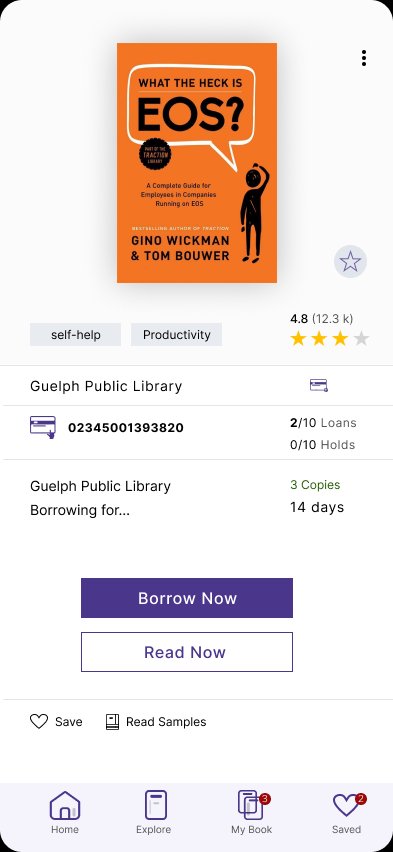
Full cover, ratings, library barcode ID, copy availability, loan duration, Borrow Now + Read Now + Save actions. Format editions link.
Borrowed (3) vs History tabs. Each loan shows cover, due date with colour coding, format, and Read Now or Return actions. Hold count visible.
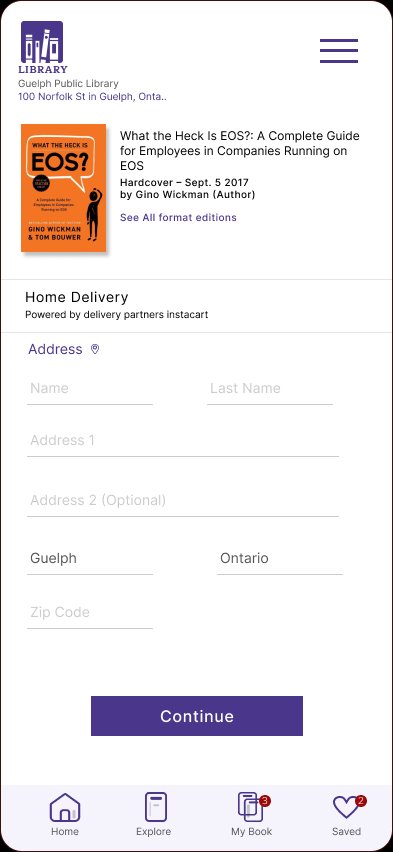
Instacart-powered delivery setup. Full address form with Guelph / Ontario pre-filled. Clear book summary shown before committing to delivery.
Credit Card, Debit Card, PayPal options with radio selection. Card form slides up on selection. Book summary stays visible throughout payment.
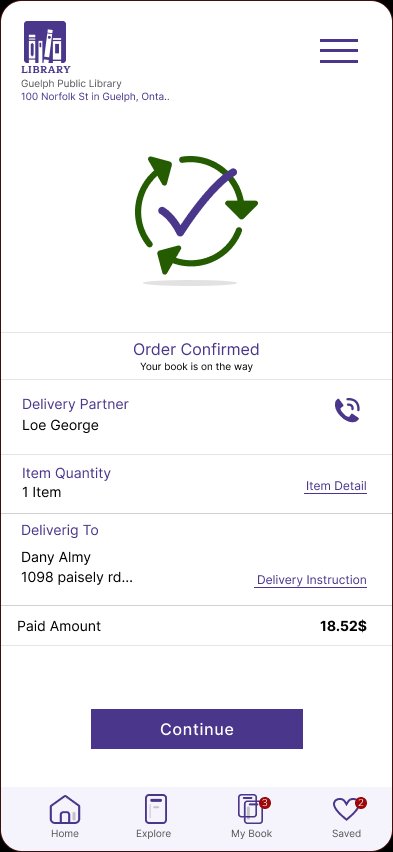
Real-time map with delivery route. "Arriving in 13 min" countdown. Delivery partner name + call button. Paid amount summary. Continue CTA.
8 participants across two rounds of moderated remote testing using Figma prototypes. Participants included 4 elderly users (65+) to ensure accessibility was validated, not assumed.
Users didn't understand why they were paying a deposit to borrow a library book. Fix: added a tooltip and inline explanation. Abandonment dropped to 0 in Round 2.
Both buttons were the same visual weight. Fix: made "Borrow Now" the filled primary and "Read Now" an outlined secondary, with clearer label copy specifying delivery vs digital.
3 of 8 users didn't register the orange "Due in 8 days" colour. Fix: added a coloured left border on each loan card and a dot indicator beside the due date text.
4 users proceeded to payment having mistyped their address. Fix: added an address confirmation card between the form and payment steps.
2 users confused the "3" badge with a notification count. Fix: changed the badge tooltip and added a small book icon alongside the number.
Task 2 (home delivery checkout) completion after Round 2
100%Up from 62% in Round 1 — the deposit explanation fix was the single biggest conversion driver.
System Usability Scale score (hi-fi Round 2)
89/100"Excellent" rating — up from 71 in Round 1. Elderly users gave it 4.7★ specifically — up from 3.1★.
Avg. time to complete delivery checkout
2m 18sFrom book detail → order confirmed. Previous web portal took 8+ minutes for similar action.
The visual system is rooted in the Guelph Library's existing purple brand — elevated with clean white surfaces, clear typographic hierarchy, and WCAG AA-compliant contrast ratios throughout.
After two rounds of testing, design iteration, and validation — the Guelph Library App achieved measurable improvements across every key metric, proving that user-centred design creates real outcomes even in the civic sector.
Reduction in delivery checkout abandonment — the refundable deposit explanation fix alone accounted for the majority of this gain after Round 1 testing.
Average time from book detail screen to order confirmed dropped from over 8 minutes on the old web portal to under 2.5 minutes in the redesigned app flow.
SUS score of 89 — "Excellent" — up from 71 in Round 1. Elderly users specifically rated it 4.7★, calling it "the first library app that didn't make me feel stupid."
All 4 elderly test users completed the full borrowing flow independently — without help from a family member — for the first time. WCAG AA contrast ratios maintained throughout.
Users expected a library app to feel "official" and simple — not flashy. The temptation to over-design was real. Restraint and clarity always won over visual complexity in testing.
The word "deposit" nearly killed the checkout flow. Copy is design — one word choice (deposit vs refundable fee) caused 6 of 8 users to hesitate. Never underestimate the UX impact of language.
Designing for elderly users with limited tech confidence exposed issues invisible when only testing with younger, tech-savvy participants. Always include your most vulnerable users in testing.